Synopsis
I’d like to control my pi using a remote control … so from eBay I got a TSOP38238 IR Receiver, from a drawer I found an old remote control …. Let do it!
Hardware
- pi model B v1 (see post on versioning your pi)
- jumper leads
- old Sony Remote RM-887
- TSOP38238 IR Receiver
.
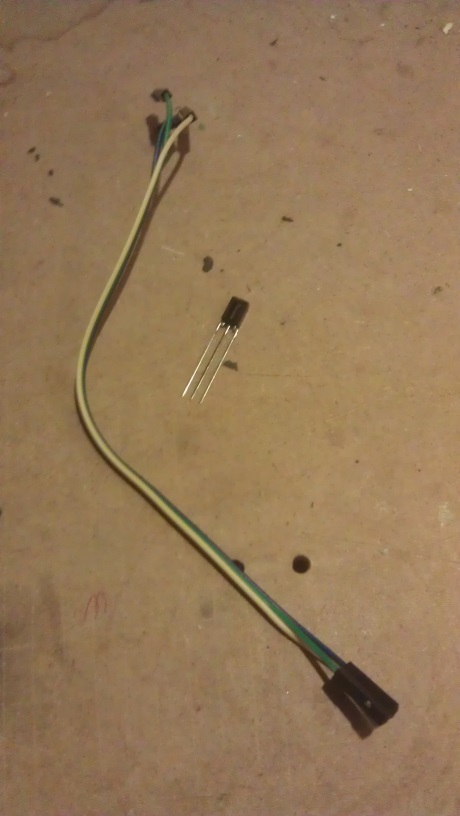
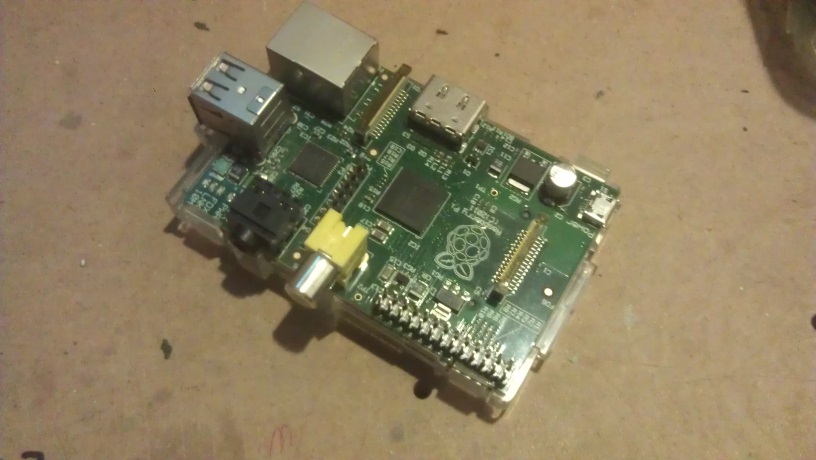

Wiring
ToDo
Installation
Lirc get:
sudo apt-get install lirc liblircclient-dev
at the end we get
[ ok ] No valid /etc/lirc/lircd.conf has been found..
[ ok ] Remote control support has been disabled..
[ ok ] Reconfigure LIRC or manually replace /etc/lirc/lircd.conf to enable..
…so lets configure…
Configure
I added the following lines to /etc/modules
lirc_dev
lirc_rpi gpio_in_pin=23 gpio_out_pin=22
Change your /etc/lirc/hardware.conf file to:
########################################################
# /etc/lirc/hardware.conf
#
# Arguments which will be used when launching lircd
LIRCD_ARGS="--uinput"

# Don't start lircmd even if there seems to be a good config file
# START_LIRCMD=false

# Don't start irexec, even if a good config file seems to exist.
# START_IREXEC=false

# Try to load appropriate kernel modules
LOAD_MODULES=true

# Run "lircd --driver=help" for a list of supported drivers.
DRIVER="default"
# usually /dev/lirc0 is the correct setting for systems using udev
DEVICE="/dev/lirc0"
MODULES="lirc_rpi"

# Default configuration files for your hardware if any
LIRCD_CONF=""
LIRCMD_CONF=""
########################################################
Edit your /boot/config.txt file and add:
dtoverlay=lirc-rpi,gpio_in_pin=23,gpio_out_pin=22
Now restart lircd so it picks up these changes:
sudo /etc/init.d/lirc stop
sudo /etc/init.d/lirc start
eek still error
[ ok ] No valid /etc/lirc/lircd.conf has been found..
[ ok ] Remote control support has been disabled..
[ ok ] Reconfigure LIRC or manually replace /etc/lirc/lircd.conf to enable..
goto here and get the right lircd.conf
http://lirc.sourceforge.net/remotes/sony/RM-887
you can make your own – notes on that are posted all over the interweb…
sudo /etc/init.d/lirc stop
sudo /etc/init.d/lirc start
[ ok ] Loading LIRC modules:.
[FAIL] Unable to load LIRC kernel modules. Verify your ... failed!
[FAIL] selected kernel modules in /etc/lirc/hardware.conf ... failed!
modules get loaded on reboot so REBOOT!!!
Testing
sudo modprobe lirc_rpi
sudo kill $(pidof lircd)
mode2 -d /dev/lirc0
point remote hit buttons code whizzes by.
… or …
irw
…output like…
0000000000000008 01 KEY_1 RM-887
0000000000000008 02 KEY_1 RM-887
0000000000000008 03 KEY_1 RM-887
0000000000000008 04 KEY_1 RM-887
0000000000000008 05 KEY_1 RM-887
0000000000000408 00 KEY_2 RM-887
0000000000000408 01 KEY_2 RM-887
0000000000000408 02 KEY_2 RM-887
0000000000000408 03 KEY_2 RM-887
0000000000000408 04 KEY_2 RM-887
0000000000000208 00 KEY_3 RM-887
0000000000000208 01 KEY_3 RM-887
0000000000000208 02 KEY_3 RM-887
0000000000000208 03 KEY_3 RM-887
0000000000000208 04 KEY_3 RM-887
0000000000000208 05 KEY_3 RM-887
0000000000000208 06 KEY_3 RM-887
0000000000000208 07 KEY_3 RM-887
0000000000000208 08 KEY_3 RM-887
0000000000000508 00 KEY_6 RM-887
0000000000000508 01 KEY_6 RM-887
0000000000000508 02 KEY_6 RM-887
…and note the buttons you’ll want to assigning stuff to.
Further Config
irexec allows u to run our own command on button presses. irexec uses the lircrc file as a mapping for button press to action.
example lircrc
sudo nano ~/.lircrc
some of my section look like:
begin
        prog = irexec
        remote = RM-887
        button = KEY_OK
        config = sudo /HDD/usb/killcam.sh
end
begin
        prog = irexec
        remote = RM-887
        button = KEY_1
        config = sudo /HDD/usb/secCam.sh 5
end
begin
        prog = irexec
        button = KEY_0
        config = sudo python /HDD/usb/LEDScript2AllOff.py
end
where killcam.sh and 5secCam.sh as BASH scripts to control my timelaspe webcam.
Note: the “button” must exactly match the button shown in irw
try it
sudo irexecPoint the remote and hit the relevant button and see the shell script fire.
Now i’d like to have irexec run at startup.
put an irexec start script in the /etc/init.d directory.
sudo nano /etc/init.d/irexec
as below
#! /bin/bash
sudo -u root /HDD/usb/restartIR.sh
#Optional logging, remove hashes to troubleshoot.
#echo $(date) ": pi-etc.init.d script executed" >> /home/xbmc/etc-init.d-irex$
exit
next to get the file to run on startup
cd ~/
sudo update-rc.d irexec defaults
Next Level – how to recover from failure
cd /etc/pm/sleep.d
sudo nano 99lirc-resume
add
#!/bin/bash
#file => /etc/pm/sleep.d/99lirc-resume
#
# This script will restart LIRC and IREXEC upon resume.
. /usr/lib/pm-utils/functions

case "$1" in
       hibernate|suspend)
        /etc/init.d/lirc stop
                ;;
        thaw|resume)
         /etc/init.d/lirc start
          sudo -u root irexec -d /home/pi/.lircrc &

#    Optional logging below for troubleshooting.  Remove the hash to enable.
#    echo $(date) ": XBMC-hibernate script executed" >> /home/xbmc/.lirc-resume.log
                ;;
        *)
                ;;
esac
exit $?
cron it an “is running” check
sudo crontab -e -u root
add
# m h  dom mon dow   command
0-59/5 * * * * /HDD/usb/restartIR.sh
and this to catch reboot ….
@reboot sh /HDD/usb/startIR.sh >/home/pi/logs/cronlog 2>&1
the restart script
#!/bin/bash

#filename /home/pi/.pi/userdata/scripts/restartIR.sh

# Test to see if irxevent is running first, if so kill it, then restart
#if ps -ef|grep -v grep|grep -i irxevent
#then
#ps aux|grep -i pi|grep -i irxevent |awk '{print $2}'|xargs kill
#else
# Do nothing
#echo "irxevent already dead!"
#fi
# Test to see if irexec is running first, if so kill it, then restart
if ps -ef|grep -v grep|grep -vi start|grep -i irexec
then
ps aux|grep -i xbmc|grep -i irexec |grep -vi start|awk '{print $2}'|xargs kill
else
# Do nothing
echo "irexec already dead!"
fi
#test to see if an instance of irxevent is already running
#if ps -ef|grep -v grep|grep irxevent
#then
# do nothing
#echo "irxevent already running"
#else
# start irxevent
#irxevent /home/pi/.lircrc &
#fi
#test to see if an instance of irexec is already running
if ps -ef|grep -v grep|grep irexec
then
# do nothing
echo "irexec already running"
else
# start irexec
irexec -d /home/pi/.lircrc &
fi
exit